Dragon Tiger Club Download – Latest APK, Games & Android Guide
Dragon Tiger Club is a mobile gaming platform featuring
Dragon VS Tiger, Rummy, Domino, Mines, Zoo Roulette,
Fruit Line and other games. Explore its features,
Android installation process, account registration,
payment menus and referral program in this complete guide.
Before downloading Dragon Tiger Club, users should review
the application information, compatibility requirements and
installation source. The table below summarizes the available
details without assuming an unverified APK version or file size.
Field
Information
App Name
Dragon Tiger Club
Category
Card, Arcade and Casino-Style Games
Platform
Android
Version
Check current download source
APK Size
Check downloaded file
Games
Dragon VS Tiger, Rummy, Domino, Mines and more
Language
Check in-app language settings
Price
Check download and in-app purchase terms
Last Updated
Verify with publisher
What Is Dragon Tiger Club?
Dragon Tiger Club is an Android gaming application that brings
different card, arcade, sports-themed and casino-style games
together in a single mobile interface. Its game lobby displays
popular titles such as Dragon VS Tiger, Zoo Roulette, Domino,
Rummy, Mines, 7 Up Down and Fruit Line.
Instead of opening several applications, users can browse
multiple categories from the same main screen. The application
displays navigation options including All, Multiplayer, Skill,
Slots and Sports. These sections organize the available games
and help visitors identify the types of entertainment offered.
Dragon Tiger Club also includes account-related menus such
as Pay, Withdraw, Shop, Share, Mail, Support and Settings.
Promotional areas, a Spin Wheel shortcut and a Refer & Earn
dashboard are visible in the supplied application screenshots.
The exact availability of individual functions may depend on
the account, region and application version.
The platform has a colorful interface featuring game artwork,
account information and clearly labeled navigation controls.
New users can explore the game categories and read the
instructions before participating. Because some games involve
chance and financial risk, the app should be treated as
entertainment rather than a source of guaranteed income.
Dragon Tiger Club for Android Users
The Android-oriented interface allows users to browse games,
manage account settings and access available transaction
options from a mobile device. Before installing the application,
users should verify the source, file permissions and device
compatibility.
Multiple Gaming Categories in One Application
The main lobby separates games into recognizable categories.
This layout makes navigation simpler for users who want to
compare different game formats. However, every game has its
own rules, possible costs and risks that should be understood
before starting.
Why Do People Prefer Dragon Tiger Club?
One reason users may explore Dragon Tiger Club is the variety
of games presented on its main screen. The application combines
card games, arcade-style selections, sports-themed options and
promotional features in a single lobby.
1. Multiple Games in One Place
Dragon Tiger Club provides access to several visibly listed
games. Players can browse different categories without
switching between unrelated applications. Each game has its
own style and should be evaluated separately.
2. Colorful and Organized Interface
The application uses large game icons, category tabs and
recognizable navigation buttons. This presentation helps
visitors identify games and account options more easily.
3. Account Management Options
The visible interface includes balance information, Settings,
Mail and Support controls. These options provide places to
review account-related information, although the actual
security and support features should be verified in the app.
4. Payment and Withdrawal Menus
Separate Pay and Withdraw controls appear in the application.
Users can inspect available payment methods, transaction
conditions and withdrawal requirements before submitting
any financial request.
5. Promotional and Referral Features
Dragon Tiger Club displays promotional options including
Spin Wheel and Refer & Earn. These may attract users interested
in exploring in-app offers. Rewards are subject to eligibility
requirements and should not be considered guaranteed.
Key Features of Dragon Tiger Club
Dragon Tiger Club combines entertainment categories with
account tools and promotional menus. The following features
are based on the supplied screenshots of the application.
Multiplayer Game Category
The lobby contains a Multiplayer tab where users can explore
games organized around multiplayer-style experiences.
Participation requirements and game availability may vary.
Card and Skill Game Options
Card-related and skill-labeled categories provide additional
choices beyond the main Dragon VS Tiger game. Users should
read the rules of each game rather than assume that a
skill label eliminates chance or financial risk.
Slots and Arcade-Style Entertainment
Games such as Fruit Line and Mines offer different visual
formats from traditional card games. These titles may use
chance-based outcomes and should be approached with a clear
understanding of their rules.
Account Balance and Wallet Controls
Balance information is displayed near the top of the
application interface. The bottom navigation also provides
Pay and Withdraw shortcuts. An in-app balance does not
necessarily represent funds available for immediate withdrawal.
Referral Program Dashboard
The Refer & Earn section includes referral information,
bonus figures and a multi-level referral diagram. Users
should review current terms to understand qualification,
reward calculation and withdrawal restrictions.
Help, Mail and Settings
Dedicated controls for Support, Mail and Settings appear
in the top navigation. These can help users locate account
information and assistance, subject to the functions
available in their version of the application.
Promotions and Spin Wheel
The lobby shows a Spin Wheel shortcut and promotional
graphics. Promotional offers may include eligibility rules,
expiry dates and conditions that must be checked before use.
Games Available in Dragon Tiger Club
Dragon Tiger Club offers several gaming categories through
its main lobby. The following game names are visible in the
supplied game screenshot. Each game has a different format,
so users should understand its individual rules before playing.
Dragon Tiger Club game lobby with Sports, Zoo Roulette,
Domino, Rummy, Dragon VS Tiger, Mines, 7 Up Down and Fruit Line.
1. Dragon VS Tiger
Dragon VS Tiger is one of the main games displayed in Dragon
Tiger Club. The familiar game format compares outcomes
associated with Dragon and Tiger. In conventional versions,
players predict which side will receive the higher card.
The exact rules, payouts and treatment of tied outcomes
depend on the version offered by the application. Players
should read the live game instructions and understand that
results are uncertain. No prediction method guarantees a win.
2. Rummy
Rummy is a well-known card-game category built around
combinations of cards. Traditional versions involve
forming sets and sequences, although the specific rules
may differ between digital platforms.
Dragon Tiger Club includes a Rummy icon in its game lobby.
Users should inspect the available game format, number
of participants, scoring system and entry requirements
before joining a table.
3. Domino
Domino is represented as a separate game option in the
application. Traditional domino games involve numbered
tiles and matching combinations. Digital adaptations
may introduce different rounds, scoring systems or
chance-based mechanics.
Before participating, users should review the instructions
inside the Domino game and understand how results are
calculated.
4. Zoo Roulette
Zoo Roulette appears in the lobby with colorful animal
artwork. The name suggests a roulette-inspired gaming
experience, but the screenshot does not establish the
exact mechanics or probabilities.
Users should check the available selections, payout
information and outcome rules before participating.
Animated graphics should not be mistaken for evidence
of favorable winning chances.
5. Mines
Mines is another game displayed in Dragon Tiger Club.
Games using this name commonly involve selecting positions
while avoiding hidden hazards. The actual grid, selection
process and payout system may differ.
Understanding when a round ends, how selections are
evaluated and whether there are entry costs is important
before using the Mines feature.
6. 7 Up Down
7 Up Down is a number-themed game shown in the application
lobby. Traditional games with this name commonly involve
outcomes above, below or equal to seven, but the live
application may use its own rules.
Players should check the available options, tie conditions
and payout table instead of relying on assumptions from
other versions of the game.
7. Fruit Line
Fruit Line is displayed with slot-style artwork featuring
reels and symbols. Slot-style games commonly use combinations
of symbols to determine results.
Before participating, users should inspect the paytable,
round cost, available symbols and bonus conditions. Slot
results can be unpredictable, and previous outcomes do
not guarantee future results.
8. Sports
Sports is a separate category shown in the Dragon Tiger
Club lobby. Its icon features sports-related artwork,
including a trophy and different balls.
The screenshot confirms the category but does not establish
the full range of sporting events or markets available.
Users should inspect current offerings, rules and applicable
restrictions inside the application.
To explore the different categories in greater detail,
visit the dedicated Dragon Tiger Club Games page.
Users who want to download Dragon Tiger Club should first
verify the application source and confirm that installation
is permitted in their location. APK files downloaded outside
an official app store require particular care.
Step 1: Open the Download Page
Select the download button and review the destination.
Check that the page belongs to the intended publisher
before downloading any application file.
Step 2: Check the APK Details
Review the current version, file size, Android compatibility
and permissions. Avoid files that request unrelated or
suspicious access to personal information.
Step 3: Download the Application
If the source is trustworthy and the app is appropriate
for your device and region, follow the download
instructions displayed on the destination page.
Step 4: Verify the Downloaded File
Scan the APK with a trusted security tool and verify
its publisher before installing. Do not bypass device
security warnings for an untrusted application.
Once the APK has been downloaded and verified, the
installation process generally follows Android's
normal application installation procedure.
Locate the verified APK file in your Downloads folder.
Open the file and review the installation prompt.
Confirm the publisher and requested permissions.
Install only if Android's security checks are satisfied.
Launch the application after installation.
Review account settings before using payment features.
Android Compatibility and Storage
Available storage, Android version and network connectivity
can affect installation. Exact requirements should be
confirmed from the current publisher information rather
than estimated from screenshots.
Common Installation Problems
Installation may fail because of an incomplete download,
unsupported Android version, insufficient storage or a
security warning. Recheck the file source and device
requirements rather than disabling security protections.
Registration and login allow users to access account-related
functions in Dragon Tiger Club. The available registration
methods may differ depending on the current app version.
How to Register a Dragon Tiger Club Account
Open the installed Dragon Tiger Club application.
Find the available registration option.
Enter your own required account details.
Complete any verification requested by the provider.
Create secure login credentials if supported.
Read the terms and privacy information before proceeding.
How to Login to Dragon Tiger Club
Open the application and select Login. Enter the credentials
associated with your account and complete any required
security verification. Keep passwords and one-time codes
private.
Account Security Tips
Use a unique password, avoid sharing account access and
check available security settings. If login problems occur,
use the official account recovery process rather than
giving personal information to unofficial support contacts.
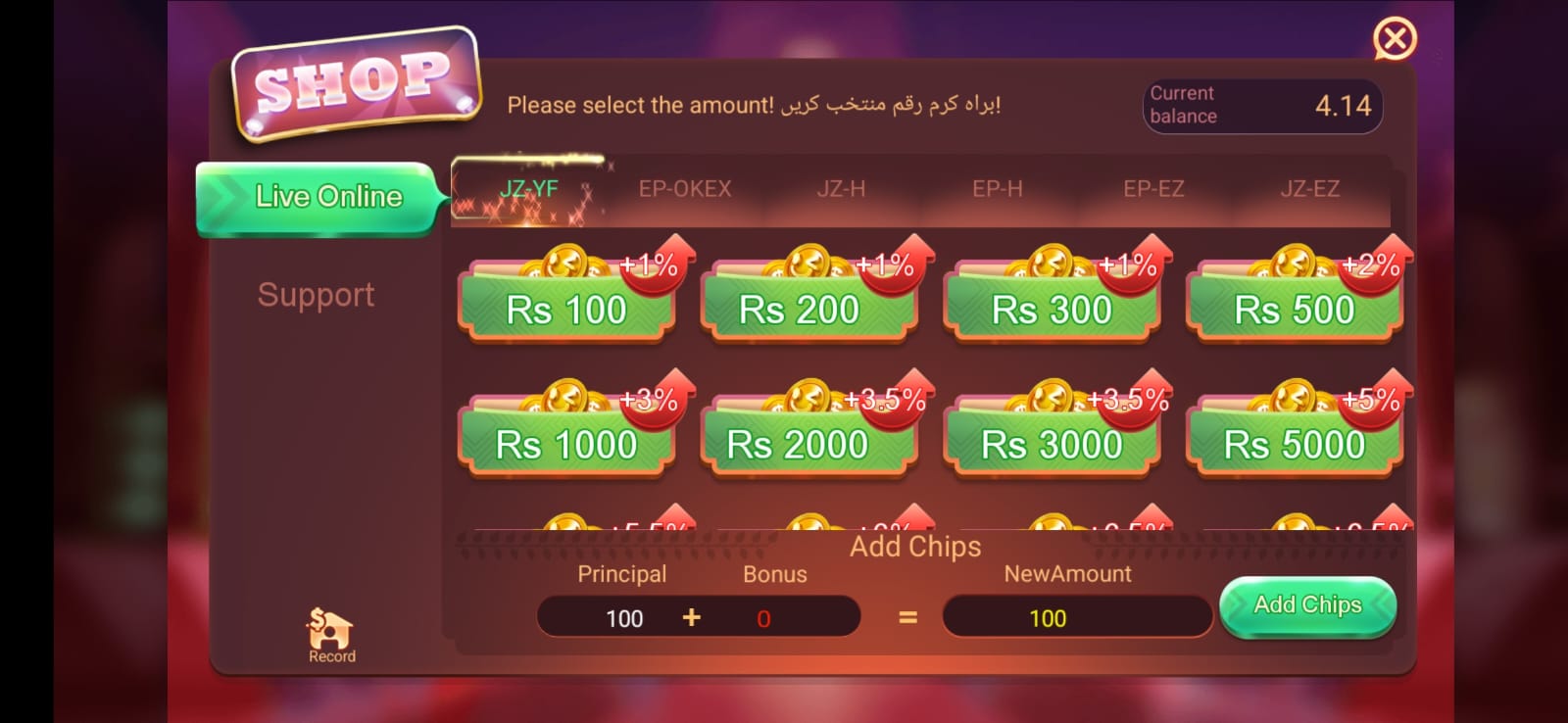
Dragon Tiger Club Deposit Guide – Pay, Shop and Payment Methods
Dragon Tiger Club displays Pay and Shop options in its
main interface. These menus are associated with account
funding, recharge or purchase-related functions.
Before depositing funds, users should inspect the current
payment methods, recipient information, transaction fees
and minimum amounts. The presence of a Pay or Shop button
does not guarantee that a particular payment provider
is supported.
How to Find the Deposit Section
Open the Dragon Tiger Club application.
Locate the Pay or Shop button in the main lobby.
Review the available recharge or deposit options.
Select only a payment method shown in the live app.
Verify the amount and recipient information.
Review the confirmation and save the transaction reference.
Dragon Tiger Club Easypaisa Deposit
Easypaisa is a widely used digital payment service in
Pakistan. If Easypaisa is listed as an available payment
method in the current Dragon Tiger Club application,
users should follow the instructions displayed inside
the verified payment interface.
Confirm the recipient details, transaction amount and
any service fees before approving payment. Do not send
money to personal numbers supplied through unofficial
messages. Easypaisa support for this app has not been
independently verified.
Dragon Tiger Club JazzCash Deposit
JazzCash is another commonly used payment service in
Pakistan. Its availability for Dragon Tiger Club should
be confirmed directly from the live Pay or Shop menu.
If offered, carefully check the displayed transaction
instructions, payment amount and recipient details.
Keep a payment receipt for reference if a transaction
requires review.
Important Things to Check Before Depositing
Review any minimum or maximum amount, transaction charges,
account verification requirements and bonus conditions.
Understand that deposits into games of chance may be lost
through gameplay and may not be refundable.
Dragon Tiger Club Pay and Shop interface for reviewing
recharge and payment options.
Complete Deposit Guide
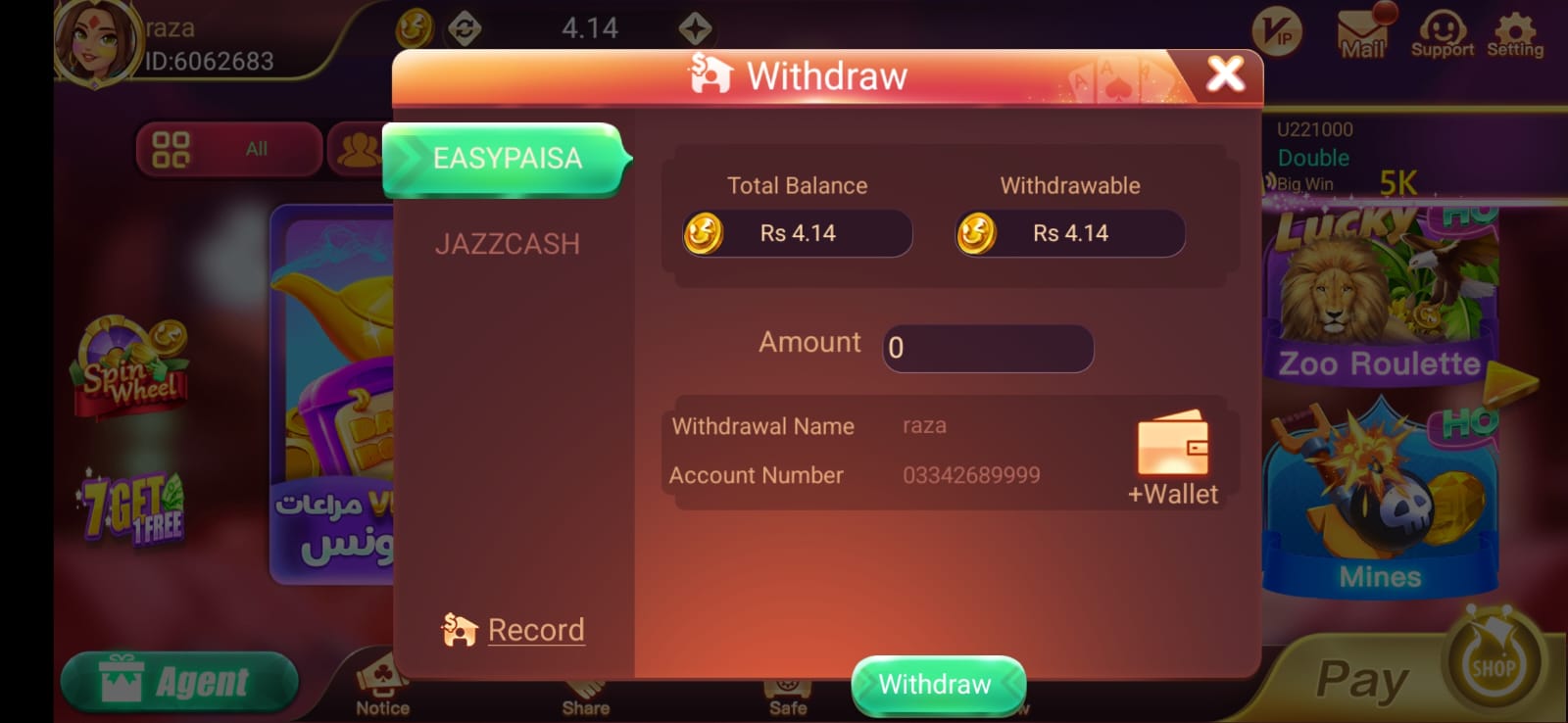
Dragon Tiger Club Withdraw Guide – Account and Payment Details
The Dragon Tiger Club interface includes a separate Withdraw
button. This section is intended for reviewing withdrawal
information and submitting requests according to the
platform's current rules.
Before requesting a withdrawal, users should check their
available balance, payment details, identity verification
requirements and any applicable restrictions. A balance
shown in the application does not guarantee that the
full amount can be withdrawn.
How to Request a Dragon Tiger Club Withdrawal
Open the Dragon Tiger Club application.
Select Withdraw from the available account controls.
Review the displayed balance and withdrawal conditions.
Choose a supported withdrawal method.
Verify the recipient account information.
Enter an amount permitted by the current rules.
Review the request and save any confirmation reference.
Withdrawal Through Easypaisa or JazzCash
Easypaisa and JazzCash are familiar payment services for
Pakistani users, but availability depends on the current
withdrawal interface. Users should select either service
only when it is explicitly supported by the application.
Account details should be checked carefully because an
incorrect recipient may cause a failed or misdirected
transaction. Never disclose verification codes or account
passwords to someone claiming they can accelerate a payout.
Withdrawal Limits and Processing
Minimum withdrawal amounts, maximum limits, processing
periods and possible service charges are determined by
the platform's current policies. These values should be
verified inside the application rather than assumed.
Why a Withdrawal May Be Delayed
A withdrawal may be delayed because of incomplete account
verification, incorrect payment details, a pending request
or conditions attached to promotional funds. Keep any
transaction reference and contact verified support if
clarification is needed.
Dragon Tiger Club withdrawal interface showing
account and withdrawal information.
Complete Withdrawal Guide
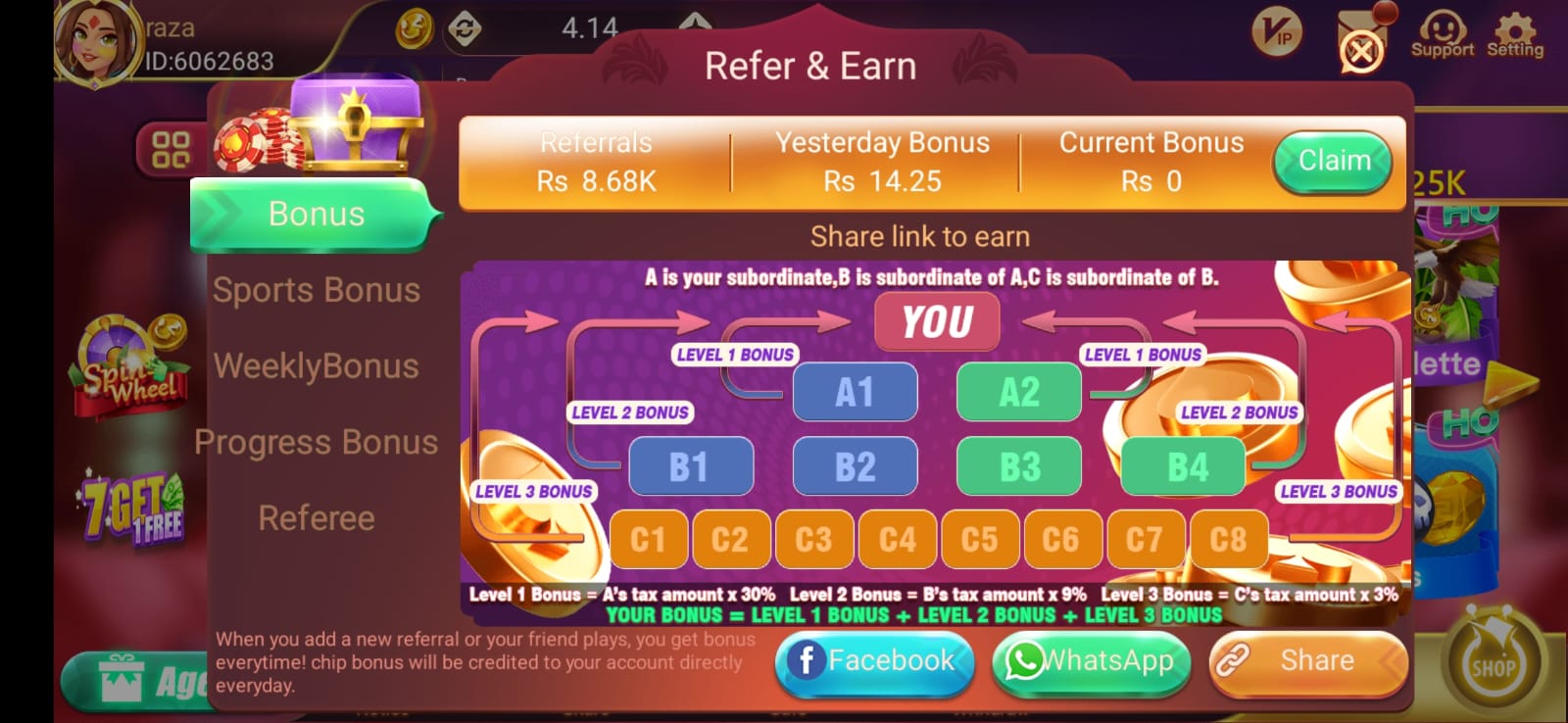
Dragon Tiger Club Referral Program – Refer & Earn Guide
Dragon Tiger Club includes a Refer & Earn dashboard.
The screenshot supplied for this section shows referral
information, bonus figures, a sharing area and a
three-level referral illustration.
Referral programs are promotional systems in which
rewards may depend on qualifying activity by invited
users. Such programs can have eligibility requirements,
calculation rules and withdrawal restrictions.
How the Dragon Tiger Club Referral Program Works
The visible dashboard explains a referral structure
using levels A, B and C. It describes direct referrals
as Level 1, referrals made by those users as Level 2,
and another level of referrals as Level 3.
The screenshot displays percentages of 30%, 9% and 3%
alongside a tax-amount calculation. These are figures
shown in the supplied screenshot, not independently
verified current reward rates. Users must check the
live referral terms before relying on them.
Level 1 Referral Bonus
Level 1 represents users invited directly through an
account's referral link. The screenshot illustrates
this first level with A-labeled participants.
Eligibility and the calculation of any reward depend
on the program's current rules.
Level 2 Referral Bonus
Level 2 represents users invited by Level 1 participants.
The dashboard illustrates this level with B-labeled
accounts. Any resulting bonus may be subject to
qualifying activity and other program requirements.
Level 3 Referral Bonus
Level 3 represents another level of invitations below
the second level. The diagram shows C-labeled accounts.
The current conditions should be verified before
assuming that a displayed bonus is payable.
How to Find and Share a Referral Link
Open the Refer & Earn section in the application.
Read the latest referral eligibility conditions.
Locate your available invitation or share option.
Share only with people who want the information.
Review qualifying activity and reward status in the dashboard.
Check withdrawal conditions before expecting payment.
Referral Dashboard and Bonus Information
The supplied screenshot contains sections labeled
Referrals, Yesterday Bonus and Current Bonus, along
with a Claim button. These figures describe a
particular account at the time the screenshot was
captured and should not be presented as typical
earnings for other users.
Referral rewards should never be described as guaranteed
income. A reward may depend on account eligibility,
verification, qualifying activity, program changes or
other restrictions. Invited users should understand
that games involving money can result in losses.
Dragon Tiger Club Bonuses and Promotional Features
The application screenshots display several promotional
areas. These include a Spin Wheel shortcut and sections
for bonus-related information. Promotions may vary
by account, app version and eligibility.
Spin Wheel Feature
The Spin Wheel shortcut is visible on the main lobby.
Users should read the feature's current rules, entry
requirements and reward conditions before participating.
The presence of a wheel does not guarantee a prize.
Recharge and Promotional Offers
Some promotional screens may relate to account recharge
or qualifying activity. Before accepting an offer,
users should understand whether funds must be deposited,
whether any wagering conditions apply and when an
offer expires.
Weekly and Progress Bonuses
The referral interface includes Weekly Bonus and
Progress Bonus labels. The exact qualifying actions,
amounts and payment conditions must be confirmed
in the live application.
Bonus Withdrawal Restrictions
Promotional balances may have conditions that differ
from ordinary account funds. Users should verify
whether a bonus can be withdrawn, expires or requires
qualifying activity before accepting it.
Important Tips Before Using Dragon Tiger Club
Verify the Application Source
APK files should be downloaded only from a source
that users can independently verify. Review the
publisher and requested permissions before installation.
Protect Personal and Payment Information
Never share passwords, verification codes or payment
credentials with unofficial contacts. Check recipient
information before approving any transaction.
Understand Game Rules and Financial Risks
Games of chance can result in financial loss. Read
the rules and avoid treating gaming or promotional
rewards as a dependable income source.
Check Local Eligibility and Restrictions
Availability and legality vary by jurisdiction.
Users should verify age restrictions, local laws
and platform eligibility requirements before use.
Dragon Tiger Club Pros and Cons
Reviewing both the useful features and potential
limitations can help users make a more informed
decision about the application.
Dragon Tiger Club presents a mobile gaming interface
containing several recognizable game categories,
including Dragon VS Tiger, Rummy, Domino, Mines,
Zoo Roulette, Fruit Line, Sports and 7 Up Down.
Its interface also includes account tools, payment
shortcuts, promotional features and a referral dashboard.
These features make the application useful to research
for visitors interested in understanding its game
selection and navigation.
Before installing or using any financial feature,
visitors should verify the publisher, current APK
details, account requirements, supported payment
methods and withdrawal rules. Promotional screenshots
are not proof of guaranteed earnings or payouts.
This website provides an independent information
guide to the application. It does not operate
Dragon Tiger Club, process transactions or
guarantee gameplay outcomes.
Frequently Asked Questions About Dragon Tiger Club
What is Dragon Tiger Club?
Dragon Tiger Club is an Android-oriented gaming
application featuring card, arcade, sports-themed
and casino-style games in one lobby.
Which games are available in Dragon Tiger Club?
The supplied lobby screenshot shows Dragon VS Tiger,
Rummy, Domino, Zoo Roulette, Mines, 7 Up Down,
Fruit Line and Sports.
How can I download Dragon Tiger Club?
Use the download link provided on this website,
verify the destination and publisher, and review
the APK details before installing.
Is Dragon Tiger Club available for Android?
The supplied application interface and download
information are Android-oriented. Confirm current
device compatibility with the publisher.
How do I register an account?
Open the application, locate the registration
option and follow the current account creation
and verification instructions.
Does Dragon Tiger Club support Easypaisa?
Easypaisa availability must be confirmed in the
live Pay or Withdraw menu. Do not assume support
from general payment information alone.
Can I use JazzCash for deposits or withdrawals?
Check the current application payment menus to
confirm whether JazzCash is supported and what
conditions apply.
How does the Refer & Earn program work?
The supplied referral screenshot shows a
three-level referral diagram and bonus information.
Actual eligibility and reward calculation depend
on current program terms.
Are Dragon Tiger Club earnings guaranteed?
No. Games of chance can cause financial losses,
and promotional rewards depend on eligibility
and other conditions.
What should I do if a withdrawal is delayed?
Review the transaction status, verification
requirements and payment details. Keep any
transaction reference and use verified support
channels for assistance.